WebAssembly (Wasm) Explained: Architecture, JS Integration, and Compiler Pipelines
For over two decades, JavaScript held a complete monopoly as the sole programming language natively executed inside web browsers. While Just-In-Time (JIT) compilation dramatically accelerated JavaScript execution, computationally intensive tasks—such as 3D rendering, video editing, game engines, and machine learning—remained difficult to run at native performance.
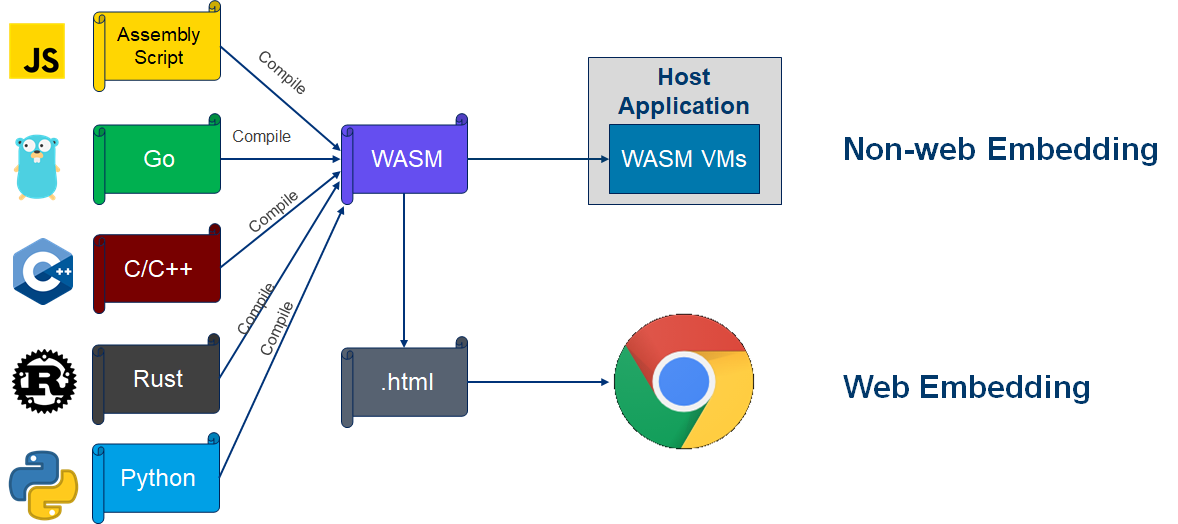
WebAssembly (Wasm) changes this paradigm. Designed as a portable, low-level binary format, WebAssembly enables high-performance languages like C, C++, Rust, and Go to execute inside modern web browsers alongside JavaScript at near-native speed.
This guide explores what WebAssembly is, where it is used, how it differs from JavaScript, unique capabilities enabled by Wasm, its underlying stack machine architecture, how to integrate Wasm with JavaScript, and how to inspect compiled output using the mitos.dev C Compiler Explorer.
1. What is WebAssembly (Wasm)?
WebAssembly (often abbreviated as Wasm) is a low-level, binary instruction format designed for a stack-based virtual machine. It was developed as an open standard by the W3C (in collaboration with engineers from Mozilla, Google, Microsoft, and Apple) and launched in 2017.
+-----------------------------------------------------------------------------------+
| SOURCE LANGUAGES               COMPILER TOOLCHAIN             TARGET RUNTIME      |
| C / C++ / Rust / Go / Zig  ---> [ LLVM / Clang / rustc ] ---> [.wasm Binary]      |
|                                                                     |             |
|                                                                     v             |
|                                                          [ Browser Wasm Engine ]  |
|                                                          [ Node.js / WASI Runtime]|
+-----------------------------------------------------------------------------------+
Core Characteristics of WebAssembly:
- Binary Format: Unlike JavaScript, which is delivered as plain text source code, Wasm is delivered as a compact binary file (
.wasm). This binary loads, parses, and executes much faster than text-based scripts. - Near-Native Performance: By compiling ahead-of-time (AOT) from languages like Rust or C++, Wasm executes instructions close to physical CPU speed.
- Sandboxed Security: Wasm runs inside the same browser security sandbox as JavaScript, preventing raw memory corruption from compromising the host system.
- Hardware-Independent: A single
.wasmbinary runs identically across x86, ARM, RISC-V, and modern mobile chipsets without recompilation.
2. Where is WebAssembly Used?
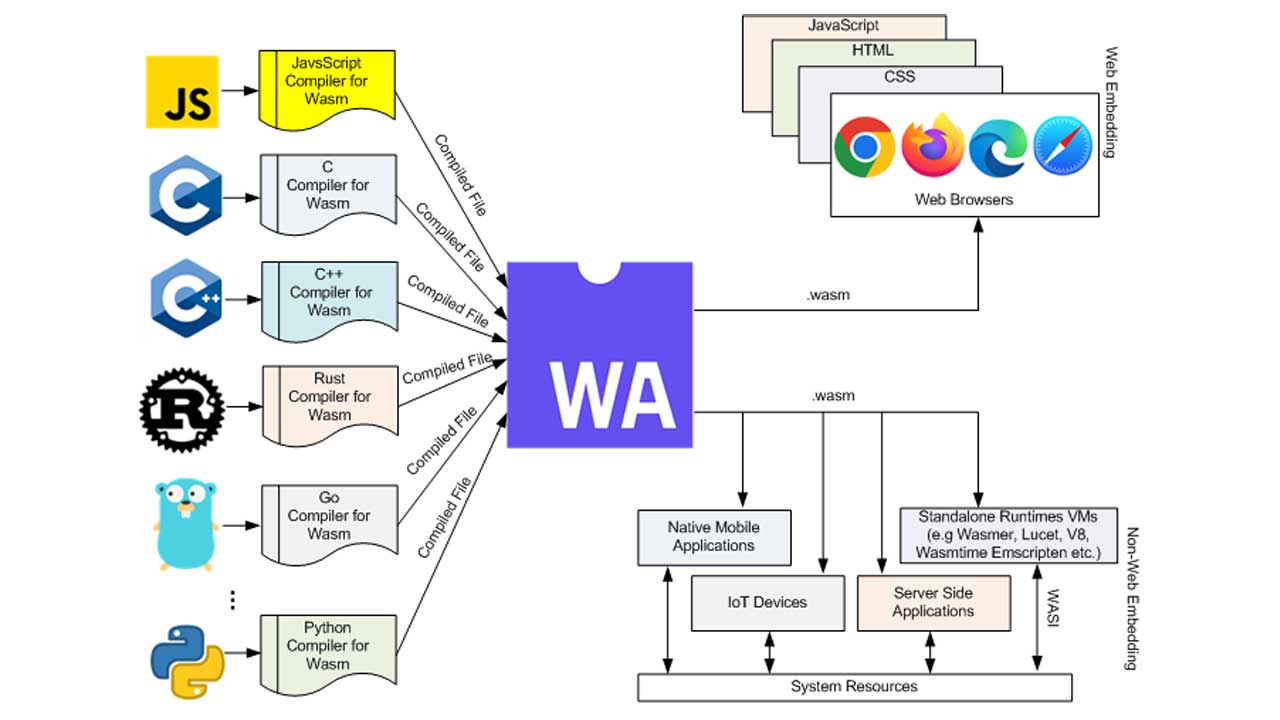
While WebAssembly was originally created for web browsers, its portability and sandboxed architecture have expanded its footprint into server-side, edge, and embedded ecosystems.
+-----------------------------------------------------------------------------------+
| WEBASSEMBLY EXECUTION ENVIRONMENTS                                                |
+--------------------------+--------------------------+-----------------------------+
| 🌐 Web Browsers          | ⚡ Server & Edge (WASI)  | 🧩 Plugin Architectures    |
| - Figma (Canvas graphics)| - Cloudflare Workers     | - Envoy Proxy Filters       |
| - Photoshop for Web      | - Fastly Compute@Edge    | - SQLite Extensions         |
| - Unity / Unreal Engines | - Docker Wasm Containers | - Database Stored Procedures|
+--------------------------+--------------------------+-----------------------------+
1. Client-Side Web Browsers
Modern desktop and mobile web browsers run WebAssembly natively. Industry examples include:
- Figma: Powered by a C++ codebase compiled to WebAssembly to deliver instant 60 FPS vector graphics rendering.
- Adobe Photoshop Web: Ported decades of C++ desktop image-processing algorithms directly into web browsers via Wasm.
- Google Earth: Replaced legacy Native Client (NaCl) plugins with WebAssembly to run its 3D rendering pipeline across all major browsers.
2. Server-Side & Edge Computing (WASI)
The WebAssembly System Interface (WASI) standardizes how Wasm modules interact with operating systems outside the browser (accessing files, network sockets, and environment variables). Cloud platforms like Cloudflare Workers and AWS Lambda use Wasm/WASI microservices because they cold-boot in sub-milliseconds with negligible memory footprint.
3. WebAssembly vs. JavaScript
WebAssembly is not a replacement for JavaScript; it is a complementary technology. While JavaScript manages dynamic UI events, DOM manipulation, and network requests, WebAssembly handles computational workloads.
| Feature | JavaScript (JS) | WebAssembly (Wasm) |
|---|---|---|
| Source Format | High-level human-readable text (.js) |
Low-level binary bytecode (.wasm) |
| Typing System | Dynamic & Weakly Typed | Static & Strongly Typed (i32, i64, f32, f64) |
| Memory Model | Garbage Collected (GC) Managed Heap | Contiguous Linear Memory (Raw ArrayBuffer) |
| Execution Pipeline | Parse text $\rightarrow$ JIT Compile $\rightarrow$ Optimize | Decode binary $\rightarrow$ Validate $\rightarrow$ Near-Native Execution |
| Performance | High (JIT-dependent, variable latency) | Predictable, near-native execution speed |
| DOM Interaction | Direct DOM access | Indirect (Must call JavaScript glue code) |
+-----------------------------------------------------------------------------------+
| JAVASCRIPT VS WEBASSEMBLY EXECUTION PIPELINE                                      |
|                                                                                   |
| JS:   [ Parse Text ] -> [ Compile/JIT ] -> [ Re-Optimize ] -> [ Run (GC Pauses) ]|
| WASM: [ Decode Binary ] --------------> [ Direct Native Execution (Predictable) ] |
+-----------------------------------------------------------------------------------+
4. Unique Use Cases Enabled by WebAssembly
Because JavaScript is interpreted and JIT-compiled dynamically, certain tasks are either practically impossible or inefficient in pure JavaScript. WebAssembly makes these capabilities accessible on the web:
1. Porting Massive Legacy Native Codebases
Compiling millions of lines of existing C, C++, or Rust code directly to .wasm allows companies to run desktop software in browsers without rewriting business logic from scratch.
Examples: Porting FFmpeg for client-side video transcoding, OpenCV for computer vision, or SQLite for client-side database management.
2. Predictable Real-Time Performance (Zero GC Janks)
JavaScript's automatic Garbage Collector periodically pauses execution to free unused heap memory. While imperceptible in standard web forms, a 20-millisecond GC pause drops frame rates in interactive 3D gaming or audio synthesizers. WebAssembly uses manual linear memory management, eliminating unpredictable garbage collection pauses.
3. High-Performance Audio Synthesis & DSP
Audio Digital Signal Processing (DSP) requires sub-millisecond buffer processing. Using WebAssembly inside Web Audio API AudioWorklet nodes allows web applications to run virtual synthesizers, active noise cancellation, and real-time audio effects without audio crackling.
4. Heavy Cryptography and Zero-Knowledge Proofs
Cryptographic operations (e.g., matrix operations for zero-knowledge proofs, end-to-end video encryption, or local machine learning inferencing with ONNX runtime) execute significantly faster when compiled into vectorized SIMD (Single Instruction, Multiple Data) WebAssembly opcodes.
5. WebAssembly Architecture & Instruction Set
WebAssembly operates on a virtual stack machine model. Instead of relying on named hardware registers (like RAX or RBX in x86 assembly), operations push values onto an implicit value stack and pop them off to compute results.
+-----------------------------------------------------------------------------------+
| STACK MACHINE COMPUTATION EXAMPLE (Evaluating: 5 + 10)                           |
|                                                                                   |
| Instruction      Value Stack State                                                |
| 1. i32.const 5   [ 5 ]                                                            |
| 2. i32.const 10  [ 5, 10 ]                                                        |
| 3. i32.add       [ 15 ]  <-- Pops top two values, adds them, pushes result        |
+-----------------------------------------------------------------------------------+
The 4 Core Value Types
At its core, WebAssembly primitive types are limited to numbers:
i32: 32-bit Integeri64: 64-bit Integerf32: 32-bit Single-Precision IEEE 754 Floating-Pointf64: 64-bit Double-Precision IEEE 754 Floating-Point
Binary (.wasm) vs. Text Format (.wat)
WebAssembly exists in two equivalent representations:
.wasm(Binary Format): Compressed bytecodes delivered over the web..wat(WebAssembly Text Format): Human-readable, S-expression syntax used for debugging and inspecting assembly operations.
Here is a simple addition function expressed in .wat text format:
(module
  (func $add (param $a i32) (param$b i32) (result i32)
    local.get $a    ;; Push parameter$a onto stack
    local.get $b    ;; Push parameter$b onto stack
    i32.add         ;; Pop $a and$b, add them, push result
  )
  (export "add" (func $add))
)
6. How to Create and Integrate WebAssembly with JavaScript
Creating and running a WebAssembly module involves writing native code, compiling it to .wasm, and instantiating it inside a JavaScript application.
Step 1: Write the Source Code (C Language)
Create a minimal C file named math.c:
// math.c
int add_numbers(int a, int b) {
    return a + b;
}
Step 2: Compile C to .wasm
Using an LLVM/Clang compiler toolchain or Emscripten:
clang --target=wasm32 -O3 -nostdlib -Wl,--no-entry -Wl,--export=add_numbers -o math.wasm math.c
Step 3: Load and Invoke Wasm inside JavaScript
Use the modern browser WebAssembly.instantiateStreaming API to fetch, compile, and instantiate the Wasm binary directly from a network stream:
// main.js
async function loadWasmModule() {
  // 1. Fetch and compile the WebAssembly binary from network
  const { instance } = await WebAssembly.instantiateStreaming(
    fetch('math.wasm')
  );

  // 2. Call the exported C function directly from JavaScript
  const result = instance.exports.add_numbers(25, 17);
  console.log(`Result from Wasm module: ${result}`); // Output: 42
}

loadWasmModule();
7. Inspect Wasm Compilation in Real-Time with Mitos.dev
Understanding how high-level C or C++ code translates into low-level WebAssembly instructions helps developers optimize performance critical paths.
Explore compilation pipelines interactively:
👉 C Compiler Explorer Tool on mitos.dev
+-----------------------------------------------------------------------------------+
| MITOS.DEV C COMPILER EXPLORER WORKFLOW                                            |
|                                                                                   |
| [ Write C Functions ] ---> [ Select Wasm Target / Flags ] ---> [ View Wasm Output]|
|                                                                                   |
|                       🔒 100% Client-Side WebAssembly Processing                  |
+-----------------------------------------------------------------------------------+
Key Features:
- Instant WebAssembly Inspection: Write standard C functions and immediately view their corresponding WebAssembly bytecode and
.wattext structures. - 100% Client-Side Execution: Compiles code locally in your browser using WebAssembly porting—your code is never transmitted to external backends.
- Optimization Level Comparisons: Tweak compiler flags (e.g.,
-O0vs-O3) to observe how loop vectorization, function inlining, and register allocation alter generated Wasm binaries.
WebAssembly expands what is possible inside web browsers. By pairing JavaScript's dynamic web framework capabilities with WebAssembly's computational performance, developers can build fast, portable, and powerful applications across desktop, mobile, and server runtime environments.
Inspect and analyze C code compiled directly to WebAssembly inside your browser using the mitos.dev C Compiler Explorer!