Understanding TLS/SSL Protocols and SSL Certificates in HTTPS
In modern web communication, security is non-negotiable. Whether you are logging into a bank account, filling out a form, or simply reading an article online, confidential data travels across public networks. Without protection, this data is vulnerable to eavesdropping, tampering, and impersonation.
TLS (Transport Layer Security) and its predecessor SSL (Secure Sockets Layer) are cryptographic protocols designed to secure communication over a computer network. When applied to HTTP, they give rise to HTTPS (Hypertext Transfer Protocol Secure).
This guide provides a deep dive into the TLS/SSL mechanism, protocol versions, practical implementation in C using OpenSSL, certificate formats, and a detailed breakdown of SSL certificate fields.
1. TLS/SSL Mechanism & How SSL Certificates Work in HTTPS
At its core, HTTPS combines standard HTTP requests and responses with an underlying TLS encryption layer. The fundamental goal of TLS is to establish an encrypted, authenticated session between two parties (typically a client web browser and a remote web server).
Hybrid Cryptography: Combining Speed and Security
TLS utilizes hybrid cryptography, combining both asymmetric (public-key) and symmetric (secret-key) cryptography:
- Asymmetric Cryptography (Public-Key Cryptography): Used during the initial handshake to authenticate the server and securely exchange or derive a shared key. Algorithms include RSA, ECDHE (Elliptic Curve Diffie-Hellman Ephemeral), and ECDSA.
- Symmetric Cryptography (Secret-Key Cryptography): Once the shared secret is established, bulk application data is encrypted using high-speed symmetric ciphers such as AES-GCM (Advanced Encryption Standard in Galois/Counter Mode) or ChaCha20-Poly1305.
+--------+                                           +--------+
| Client |                                           | Server |
+---+----+                                           +---+----+
|                                                    |
| ------------ 1. TCP Handshake (SYN/ACK) ---------> |
|                                                    |
| ------------ 2. Client Hello --------------------> |
|              (Supported TLS versions, ciphers,     |
|               random nonce)                        |
|                                                    |
| <----------- 3. Server Hello & Certificate ------- |
|              (Chosen cipher, Server Cert,          |
|               Server random, DH Key exchange)      |
|                                                    |
| [ Verify Certificate against Root CAs ]            |
|                                                    |
| ------------ 4. Key Exchange / Finished ---------> |
|              (Client DH parameter,                 |
|               Encrypted Finished spec)             |
|                                                    |
| <----------- 5. Server Finished ------------------ |
|                                                    |
| <==========  6. Encrypted HTTPS Traffic ===========> |
|              (Symmetric AES-GCM / ChaCha20)        |
|                                                    |
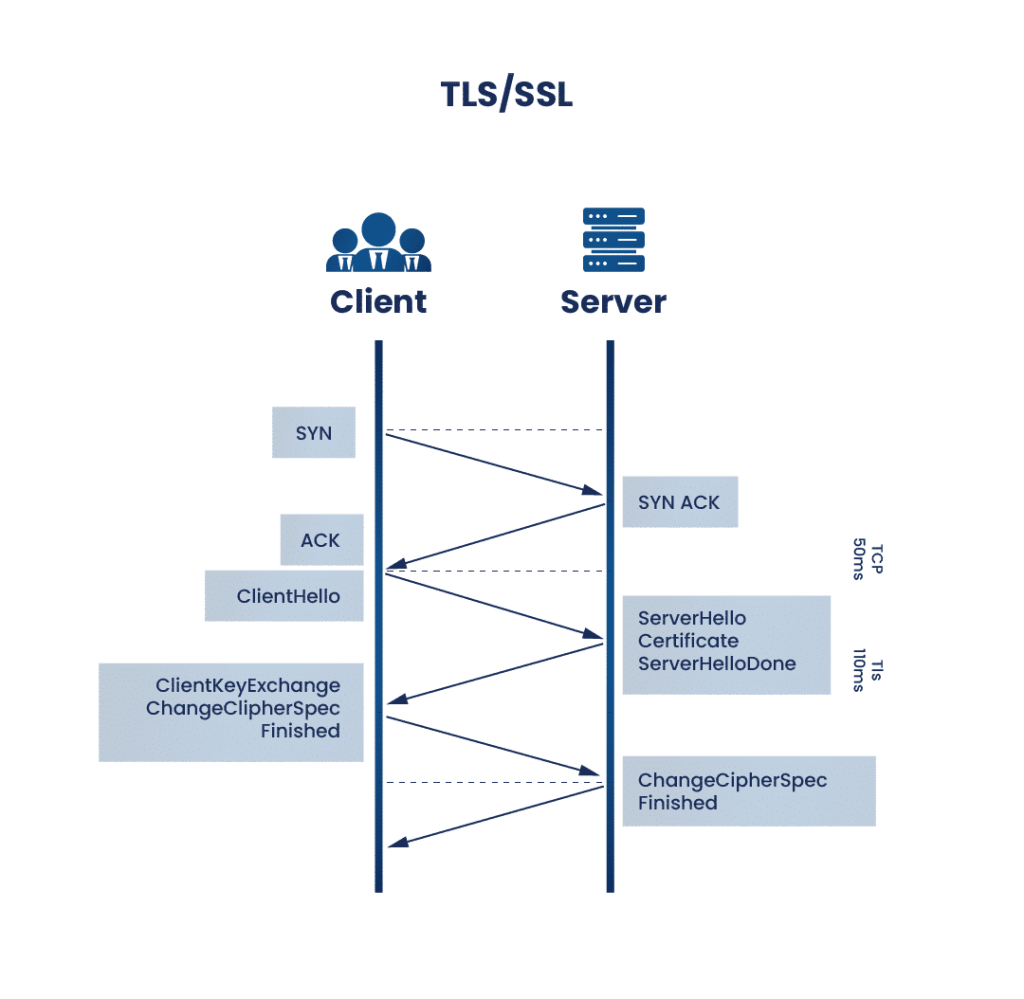
The TLS Handshake Step-by-Step
- TCP Connection Establishment: The client and server complete a standard 3-way TCP handshake (
SYN,SYN-ACK,ACK). - Client Hello: The client sends a message containing the highest TLS protocol version it supports, a list of supported cipher suites, a client-generated random string, and extensions (such as SNI - Server Name Indication).
- Server Hello & Certificate Delivery: The server responds with the chosen TLS version, selected cipher suite, server random string, and its SSL/TLS Certificate.
- Certificate Verification & Key Exchange: The client validates the server's certificate against its local trusted Root Certificate Authorities (CAs). Using Diffie-Hellman (ECDHE) exchange, both parties compute the master secret independently without transmitting key material over the wire.
- Session Encryption Initiated: Both parties send "Finished" messages encrypted with the newly derived symmetric keys. From this point onward, all HTTP data is encrypted payload.
The Role of Certificate Authorities (Chain of Trust)
An SSL certificate links a public key to an organizational domain name. To ensure trust:
- Root CAs: Highly secure entity certificates pre-installed in operating systems and browsers (e.g., DigiCert, Let's Encrypt, Sectigo).
- Intermediate CAs: Issued by Root CAs to sign end-entity certificates, keeping the Root CA offline and secure.
- Leaf (End-Entity) Certificate: Issued to your specific domain (e.g.,
mitos.dev).
When a browser connects, it follows the Chain of Trust from the Leaf Certificate up through Intermediate CAs to a trusted Root CA stored in the browser's trust store.
2. TLS/SSL Protocol Versions & Evolution
Cryptographic standards evolve rapidly as older algorithms become vulnerable to mathematical attacks or computing advances.
| Protocol Version | Year Released | Status | Key Features & Changes |
|---|---|---|---|
| SSL 1.0 | 1994 | Unreleased | Never released publicly due to severe security flaws. |
| SSL 2.0 | 1995 | Deprecated (2011) | First public version; highly vulnerable (DROWN, MAC issues). |
| SSL 3.0 | 1996 | Deprecated (2015) | Complete redesign; vulnerable to POODLE attack. |
| TLS 1.0 | 1999 | Deprecated (2020) | Upgrade from SSL 3.0; vulnerable to BEAST & BEAST variants. |
| TLS 1.1 | 2006 | Deprecated (2020) | Added explicit IVs; vulnerable to modern cipher suite flaws. |
| TLS 1.2 | 2008 | Active / Standard | Introduced SHA-256, authenticated encryption (AEAD), custom ciphers. |
| TLS 1.3 | 2018 | Current Best Practice | Faster 1-RTT handshake, removed legacy ciphers (RSA key exchange, 3DES, RC4), mandatory Perfect Forward Secrecy (PFS). |
Why TLS 1.3 is Superior
TLS 1.3 simplified the handshake from 2 round-trips (2-RTT) to 1 round-trip (1-RTT), reducing latency significantly. Furthermore, static RSA key exchange was completely removed—ensuring that even if a server's private key is compromised in the future, past encrypted traffic cannot be retroactively decrypted (Perfect Forward Secrecy).
3. Key Benefits of Implementing TLS/SSL
- Confidentiality: Prevents unauthorized parties (ISPs, public Wi-Fi eavesdroppers) from inspecting sensitive data such as login credentials, credit card details, and personal data.
- Data Integrity: Ensures data cannot be altered, injected, or corrupted during transit without detection, using MAC (Message Authentication Codes) or AEAD modes.
- Authentication: Proves to the client that they are interacting with the actual server owner rather than a Man-in-the-Middle (MitM) imposter or phishing site.
- Search Engine Optimization (SEO): Major search engines like Google give ranking preference to HTTPS-enabled websites.
- Browser Compliance & User Trust: Modern browsers flag HTTP sites as "Not Secure," causing high bounce rates and loss of user confidence.
4. Popular Libraries for TLS/SSL Implementation
When integrating TLS/SSL in custom applications, developers rely on robust C/C++ libraries or native language bindings:
- OpenSSL: The standard open-source toolkit implementing SSL v2/v3 and TLS protocols, widely used across Unix-like operating systems.
- BoringSSL: Google's fork of OpenSSL, stripped of unnecessary legacy features and optimized for Chrome, Android, and internal infrastructure.
- LibreSSL: OpenBSD's fork focused on code modernization, safety, and removing obsolete legacy features.
- mbed TLS (formerly PolarSSL): Lightweight TLS library maintained by Arm, designed for memory-constrained embedded devices and IoT devices.
- wolfSSL: A lean, portable TLS library geared towards embedded applications and automotive systems.
5. C Implementation Example Using OpenSSL
Below is a concise C code example demonstrating how to initialize an OpenSSL TLS client, connect to an HTTPS server (e.g., mitos.dev on port 443), perform the TLS handshake, send a minimal HTTP GET request, and print the response.
#include <stdio.h>
#include <stdlib.h>
#include <string.h>
#include <unistd.h>
#include <arpa/inet.h>
#include <netdb.h>
#include <openssl/ssl.h>
#include <openssl/err.h>

int main() {
    const char *hostname = "mitos.dev";
    int port = 443;
    int sockfd;
    struct hostent *host;
    struct sockaddr_in addr;
    SSL_CTX *ctx;
    SSL *ssl;
    char buffer[1024];
    int bytes;

    // 1. Initialize OpenSSL algorithms and error strings
    SSL_library_init();
    OpenSSL_add_all_algorithms();
    SSL_load_error_strings();

    // 2. Create TLS client context
    ctx = SSL_CTX_new(TLS_client_method());
    if (!ctx) {
        ERR_print_errors_fp(stderr);
        return EXIT_FAILURE;
    }

    // 3. Resolve hostname and create standard TCP socket
    host = gethostbyname(hostname);
    if (!host) {
        perror("DNS resolution failed");
        return EXIT_FAILURE;
    }

    sockfd = socket(AF_INET, SOCK_STREAM, 0);
    memset(&addr, 0, sizeof(addr));
    addr.sin_family = AF_INET;
    addr.sin_port = htons(port);
    addr.sin_addr = *((struct in_addr *)host->h_addr_list[0]);

    if (connect(sockfd, (struct sockaddr *)&addr, sizeof(addr)) != 0) {
        perror("Socket connect failed");
        return EXIT_FAILURE;
    }

    // 4. Create SSL structure and attach to socket
    ssl = SSL_new(ctx);
    SSL_set_fd(ssl, sockfd);
    SSL_set_tlsext_host_name(ssl, hostname); // SNI extension

    // 5. Perform TLS Handshake
    if (SSL_connect(ssl) <= 0) {
        ERR_print_errors_fp(stderr);
    } else {
        printf("Connected with %s encryption cipher!\n\n", SSL_get_cipher(ssl));

        // 6. Send HTTP GET Request
        char request[256];
        snprintf(request, sizeof(request),
                 "GET / HTTP/1.1\r\nHost: %s\r\nConnection: close\r\n\r\n", hostname);
        SSL_write(ssl, request, strlen(request));

        // 7. Read HTTP Response Header/Body
        while ((bytes = SSL_read(ssl, buffer, sizeof(buffer) - 1)) > 0) {
            buffer[bytes] = '\0';
            printf("%s", buffer);
        }
    }

    // 8. Cleanup resources
    SSL_shutdown(ssl);
    SSL_free(ssl);
    close(sockfd);
    SSL_CTX_free(ctx);
    return EXIT_SUCCESS;
}
To compile and run this C snippet on Linux/macOS:
gcc -o tls_client tls_client.c -lssl -lcrypto
./tls_client
6. SSL Certificate Format Example
SSL/TLS certificates follow the X.509 standard (RFC 5280). When exported or transmitted, they are typically encoded in PEM (Privacy-Enhanced Mail) format—a Base64 ASCII text format wrapped in header and footer lines.
Raw PEM Format Example
-----BEGIN CERTIFICATE-----
MIIF3jCCA8agAwIBAgIQAf3m9Z4fA4y9Q9Z8XYZ123ANBgkqhkiG9w0BAQsFADCB
kDELMAkGA1UEBhMCVVMxEzARBgNVBAgTCkNhbGlmb3JuaWExRjAUBgNVBAoTDUxl
dCdzIEVuY3J5cHQxEDAOBgNVBAsTB1JPT1QgQ0ExMzAxBgNVBAMTKkxldCdzIEVu
Y3J5cHQgQXV0aG9yaXR5IFgzIENlcnRpZmljYXRlIChSMykwHhcNMjQwMTAxMDAw
MDAwWhcNMjQwNDAxMDAwMDAwWjBHMQswCQYDVQQGEyJVUzETMBEGA1UECBMKQ2Fs
aWZvcm5pYTEQMA4GA1UEChMHbWl0b3MuZGV2MRIwEAYDVQQDEyltaXRvcy5kZXYw
... (Base64 Encoded Certificate Data) ...
-----END CERTIFICATE-----
7. Interactive Experiment: Inspect Certificates Yourself
To explore, inspect, and decode SSL certificates interactively right inside your browser, check out our built-in utility:
👉 Open SSL Certificate Viewer Tool
You can paste any domain name or PEM-encoded certificate into the viewer tool to inspect its underlying X.509 fields, issuer hierarchy, signature algorithm, key size, and exact expiration dates.
8. Detailed Explanation of SSL Certificate Fields
When an X.509 certificate is decoded, it contains specific structured fields defined by the ITU-T X.509 standard. Understanding these fields is essential for security auditing and certificate management:
+-------------------------------------------------------------------+
|                    X.509 Certificate Structure                    |
+-------------------------------------------------------------------+
| Version: v3                                                       |
| Serial Number: 03:A4:B9:7F:12:88:E2...                            |
| Signature Algorithm: sha256WithRSAEncryption                      |
| Issuer: C=US, O=Let's Encrypt, CN=R3                              |
| Validity:                                                         |
|   Not Before: Jan  1 00:00:00 2026 GMT                            |
|   Not After : Apr  1 00:00:00 2026 GMT                            |
| Subject: CN=mitos.dev                                             |
| Subject Public Key Info:                                          |
|   Algorithm: RSA / EC (2048-bit / P-256)                          |
| Extensions:                                                       |
|   Subject Alternative Name (SAN): mitos.dev, *.mitos.dev          |
|   Basic Constraints: CA:FALSE                                     |
|   Key Usage: Digital Signature, Key Encipherment                  |
|   Extended Key Usage: TLS Web Server Authentication               |
+-------------------------------------------------------------------+
Key Fields Breakdown
1. Version
Specifies the X.509 version format. Almost all modern SSL certificates use Version 3 (v3), which supports custom extensions such as SAN and Key Usage.
2. Serial Number
A unique positive integer assigned by the issuing Certificate Authority (CA) to distinguish the certificate from all others issued by that CA. Used during revocation checking (CRL / OCSP).
3. Signature Algorithm
The cryptographic hash and signature algorithm used by the CA to sign the certificate (e.g., sha256WithRSAEncryption or ecdsa-with-SHA256).
4. Issuer
Identifies the Certificate Authority that verified the domain ownership and signed the certificate. Contains attributes such as:
- C (Country):
US - O (Organization):
Let's Encrypt - CN (Common Name):
R3orDigiCert Global TLS RSA SHA256 Root CA
5. Validity Period (Not Before / Not After)
Defines the timeframe during which the certificate is active and trusted:
- Not Before: The exact UTC timestamp when the certificate becomes valid.
- Not After: The exact UTC timestamp when the certificate expires. Browsers reject certificates outside this window. Modern certificates (like Let's Encrypt) are valid for 90 days.
6. Subject
Identifies the entity (domain/owner) to whom the certificate belongs.
- CN (Common Name): The primary domain name protected (e.g.,
mitos.dev). Note: Modern browsers rely primarily on SAN rather than CN.
7. Subject Public Key Info
Contains the public key algorithm (e.g., RSA or ECC), key length (e.g., 2048-bit, 4096-bit, or prime256v1), and the public key bits.
8. Extensions (X.509 v3 Extensions)
Extensions provide vital operational constraints and features:
- Subject Alternative Name (SAN): Allows a single SSL certificate to secure multiple domain names (e.g.,
mitos.dev,www.mitos.dev,*.mitos.dev). - Basic Constraints: Identifies whether the subject is a Certificate Authority (
CA:TRUEorCA:FALSE). - Key Usage: Defines technical cryptographic operations allowed (e.g.,
Digital Signature,Key Encipherment). - Extended Key Usage (EKU): Indicates specific application scenarios (e.g.,
TLS Web Server Authentication,TLS Web Client Authentication). - Authority Info Access (AIA): Contains URLs to fetch intermediate CA certificates or perform online revocation checks (OCSP response points).
9. Thumbprint / Fingerprint (SHA-256)
A calculated hash over the entire binary DER encoded certificate. While not officially an internal field, it serves as a unique identifier for certificate pinning and tracking.
Conclusion
Understanding TLS/SSL and SSL certificates is vital for system architects, backend developers, and security engineers alike. From the symmetric and asymmetric cryptography used in the TLS handshake to the X.509 field structure verified by client browsers, every layer of the protocol ensures secure, tamper-proof web interactions.
Don't forget to test and inspect live domain certificates using our SSL Certificate Viewer Tool!