Dissecting PNG: Binary Structure, Compression Algorithms, and Chunk Analysis
Image formats often feel like black boxes to developers. We load a .png file into a browser or application, and pixels appear on the screen. However, under the hood, the Portable Network Graphics (PNG) format is an elegant raster graphics standard built on strict binary layouts, predictive spatial filtering, and lossless entropy compression.
Designed in 1995 as a patent-free successor to the GIF format, PNG remains the industry standard for lossless images on the web due to its transparency support (alpha channel), robust error detection, and modular architecture.
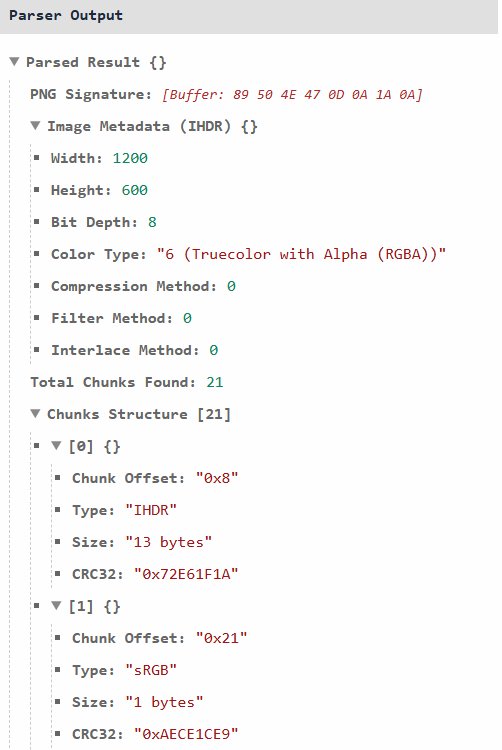
This article dissects the PNG format from the ground up: breaking down its magic signature, explaining its underlying compression mechanisms, analyzing its chunk-based binary structure, providing a practical C implementation with libpng, and showing how to perform binary forensics using the mitos.dev Hex Editor.
1. What is the PNG Format?
PNG is an unpatented, bitmapped image format that uses lossless data compression. Unlike JPEG—which discards high-frequency visual details to achieve smaller file sizes—PNG reconstructs pixel data with $100%$ visual accuracy upon decoding.
Key Characteristics:
- Lossless Reproduction: Every pixel retrieved by the decoder matches the original source pixel exactly.
- Flexible Color Support: Supports palette-based (indexed) images, grayscale, truecolor (24-bit RGB), and truecolor with transparency (32-bit RGBA).
- Chunk-Based Extensibility: Data inside a PNG file is stored in self-contained blocks called chunks, allowing applications to ignore unknown metadata without failing to render the image.
- Integrity Validation: Every chunk includes Cyclic Redundancy Check (CRC-32) checksums to catch file corruption.
2. PNG Compression Pipeline & Underlying Algorithms
PNG achieves high compression ratios without losing quality by splitting compression into two distinct stages: Pre-processing (Filtering) and Entropy Encoding (Deflate).
+-----------------------------------------------------------------------------------+
| PNG COMPRESSION PIPELINE                                                          |
|                                                                                   |
| Raw Pixel Data ---> [ Delta Filtering ] ---> [ Deflate (LZ77 + Huffman) ] ---> PNG Data
| (Absolute RGB)      (Predictive Differences)    (Entropy Compression)    (IDAT Chunks)
+-----------------------------------------------------------------------------------+
Phase 1: Spatial Filtering (Pre-Processing)
Compression algorithms perform best on repeating data patterns. Raw images, however, contain smooth gradients and subtle color shifts that break repetitive byte streams.
To solve this, PNG applies a Filter to each scanline (row of pixels) before compression. Filtering replaces absolute pixel color values with relative differences (deltas) from neighboring pixels.
PNG defines 5 basic filter types per scanline:
| Filter ID | Filter Name | Formula / Description |
|---|---|---|
0 |
None | Transmits raw pixel byte as-is. |
1 |
Sub | Computes difference between current pixel and left neighbor: $x - \text{Left}$. |
2 |
Up | Computes difference between current pixel and top neighbor: $x - \text{Above}$. |
3 |
Average | Computes difference against average of left and top: $x - \lfloor(\text{Left} + \text{Above}) / 2\rfloor$. |
4 |
Paeth | Uses a linear predictor function based on left, above, and top-left neighbors. |
The Paeth Predictor Algorithm
The Paeth filter predicts pixel values by analyzing three adjacent pixels: Left ($a$), Above ($b$), and Top-Left ($c$). It calculates the distance to $p = a + b - c$ and picks the actual neighbor closest to $p$. This turns complex visual gradients into long sequences of zeros or near-zero values, significantly increasing compression efficiency.
Phase 2: The Deflate Algorithm
Once scanlines are filtered, the resulting byte array is compressed using the Deflate algorithm (the same algorithm behind gzip and zlib).
Deflate combines two lossless data compression techniques:
- LZ77 (Sliding Window Dictionary): Scans the byte stream for repeating patterns within a sliding window. When a repeated sequence is found, it replaces it with a
(Distance, Length)pointer referencing the earlier occurrence. - Huffman Coding (Entropy Encoding): Assigns variable-length bit codes to symbols based on frequency. Frequently occurring byte sequences are assigned short bit sequences (e.g., 2 bits), while rare symbols get longer bit sequences.
3. Binary Structure of PNG
Every PNG file consists of two main parts: an 8-byte File Signature (Header) followed by a sequential series of Chunks.
+-----------------------------------------------------------------------------------+
| PNG FILE BINARY LAYOUT                                                            |
|                                                                                   |
| +-------------------------------------------------------------------------------+ |
| | PNG Signature (8 Bytes): 89 50 4E 47 0D 0A 1A 0A                              | |
| +-------------------------------------------------------------------------------+ |
| | Critical Chunk: IHDR (Image Header / Dimensions & Color Type)                 | |
| +-------------------------------------------------------------------------------+ |
| | Optional Ancillary Chunks (gAMA, pHYs, tEXt, etc.)                            | |
| +-------------------------------------------------------------------------------+ |
| | Critical Chunk: PLTE (Palette - required for indexed images)                  | |
| +-------------------------------------------------------------------------------+ |
| | Critical Chunk(s): IDAT (Compressed Image Payload - can be split across chunks)| |
| +-------------------------------------------------------------------------------+ |
| | Critical Chunk: IEND (Image Trailer / Signals End of File)                    | |
| +-------------------------------------------------------------------------------+ |
+-----------------------------------------------------------------------------------+
The 8-Byte PNG Signature
The first 8 bytes of every valid PNG file are fixed magic numbers designed to catch common file transmission errors immediately:
| Byte (Hex) | ASCII / Represented Value | Purpose / Detection Function |
|---|---|---|
89 |
Non-ASCII (137) |
Detects systems that strip the high bit (7-bit channels). |
50 4E 47 |
"PNG" |
Human-readable ASCII identification. |
0D 0A |
\r\n (CR-LF) |
Detects illegal DOS-to-Unix line-ending conversions. |
1A |
Ctrl-Z / EOF |
Stops file output when viewed using DOS type commands. |
0A |
\n (LF) |
Detects illegal Unix-to-DOS line-ending conversions. |
Anatomy of a PNG Chunk
Following the signature, all PNG data is packaged inside chunks. Every chunk follows a strict 4-field binary layout:
+-------------------+-------------------+-------------------+-------------------+
| Length (4 Bytes)  | Type (4 Bytes)    | Data (N Bytes)    | CRC-32 (4 Bytes)  |
| Big-endian uint32 | ASCII Identifiers | Raw Payload       | Checksum          |
+-------------------+-------------------+-------------------+-------------------+
- Length (4 Bytes): Big-endian integer specifying the byte size of the Data field only.
- Chunk Type (4 Bytes): 4 ASCII letters encoding chunk name and properties.
- Chunk Data ($N$ Bytes): The payload content (can be $0$ bytes).
- CRC-32 (4 Bytes): Cyclic Redundancy Check calculated over the Chunk Type and Chunk Data fields to ensure zero transmission corruption.
Chunk Naming Conventions (Case-Sensitivity Matters)
The capitalization of the 4 letters in a chunk name dictates its properties:
- 1st Letter (Bit 5 of Byte 0): Uppercase = Critical chunk; Lowercase = Ancillary (optional) chunk.
- 2nd Letter (Bit 5 of Byte 1): Uppercase = Public standard; Lowercase = Private/vendor extension.
- 3rd Letter (Bit 5 of Byte 2): Must be Uppercase (reserved for future standard revisions).
- 4th Letter (Bit 5 of Byte 3): Uppercase = Unsafe to copy if modified; Lowercase = Safe to copy.
Critical vs. Ancillary Chunks
Critical Chunks (Must be processed by decoder)
IHDR(Image Header): Must be the first chunk. Contains image width, height, bit depth, color type, compression method, filter method, and interlace method.PLTE(Palette): Contains color palette entries required for indexed-color images.IDAT(Image Data): Contains the actual Deflate-compressed, filtered pixel stream. Image data can be split across multiple consecutiveIDATchunks.IEND(Image Trailer): Marks the end of the PNG stream. Its data length is0.
Common Ancillary Chunks (Optional metadata)
pHYs(Physical Pixel Dimensions): Defines pixel aspect ratio or target DPI.tEXt/zTXt: Stores uncompressed or compressed textual metadata (e.g., author, software, copyright).gAMA: Specifies gamma correction curves.tRNS: Specifies transparency values for non-RGBA palette images.
4. C Implementation: Reading PNG Headers with libpng
The official C library for manipulating PNG files is libpng. The following C program opens a .png binary file, verifies the 8-byte PNG signature, initializes the libpng decoder structures, and extracts the structural parameters from the IHDR chunk.
#include <stdio.h>
#include <stdlib.h>
#include <png.h>

#define PNG_SIG_BYTES 8

void inspect_png_header(const char *filename) {
    FILE *fp = fopen(filename, "rb");
    if (!fp) {
        perror("Failed to open file");
        return;
    }

    // 1. Validate PNG 8-byte signature
    png_byte header[PNG_SIG_BYTES];
    if (fread(header, 1, PNG_SIG_BYTES, fp) != PNG_SIG_BYTES) {
        fprintf(stderr, "Error: Could not read PNG signature.\n");
        fclose(fp);
        return;
    }

    if (png_sig_cmp(header, 0, PNG_SIG_BYTES)) {
        fprintf(stderr, "Error: File '%s' is not a valid PNG.\n", filename);
        fclose(fp);
        return;
    }
    printf("✅ Valid PNG Signature confirmed.\n");

    // 2. Initialize libpng read structure
    png_structp png_ptr = png_create_read_struct(PNG_LIBPNG_VER_STRING, NULL, NULL, NULL);
    if (!png_ptr) {
        fclose(fp);
        return;
    }

    // 3. Initialize libpng info structure
    png_infop info_ptr = png_create_info_struct(png_ptr);
    if (!info_ptr) {
        png_destroy_read_struct(&png_ptr, NULL, NULL);
        fclose(fp);
        return;
    }

    // 4. Set up libpng error handling jump context
    if (setjmp(png_jmpbuf(png_ptr))) {
        fprintf(stderr, "Error during PNG header decoding.\n");
        png_destroy_read_struct(&png_ptr, &info_ptr, NULL);
        fclose(fp);
        return;
    }

    // 5. Connect I/O stream and inform libpng of already verified signature bytes
    png_init_io(png_ptr, fp);
    png_set_sig_bytes(png_ptr, PNG_SIG_BYTES);

    // 6. Read IHDR metadata chunk
    png_read_info(png_ptr, info_ptr);

    png_uint_32 width, height;
    int bit_depth, color_type, interlace_type;

    png_get_IHDR(png_ptr, info_ptr, &width, &height, &bit_depth, &color_type,
                 &interlace_type, NULL, NULL);

    // 7. Output extracted IHDR properties
    printf("\n--- PNG IHDR Chunk Properties ---\n");
    printf("Width:          %u px\n", width);
    printf("Height:         %u px\n", height);
    printf("Bit Depth:      %d bits/channel\n", bit_depth);
    printf("Color Type:     %d (", color_type);

    switch(color_type) {
        case PNG_COLOR_TYPE_GRAY:        printf("Grayscale)\n"); break;
        case PNG_COLOR_TYPE_RGB:         printf("Truecolor RGB)\n"); break;
        case PNG_COLOR_TYPE_PALETTE:     printf("Indexed Color Palette)\n"); break;
        case PNG_COLOR_TYPE_GRAY_ALPHA:  printf("Grayscale + Alpha)\n"); break;
        case PNG_COLOR_TYPE_RGBA:        printf("Truecolor RGBA)\n"); break;
        default:                         printf("Unknown)\n"); break;
    }

    printf("Interlace Mode: %s\n", interlace_type == PNG_INTERLACE_NONE ? "None" : "Adam7");

    // 8. Clean up resources
    png_destroy_read_struct(&png_ptr, &info_ptr, NULL);
    fclose(fp);
}

int main(int argc, char *argv[]) {
    if (argc < 2) {
        printf("Usage: %s <image.png>\n", argv[0]);
        return 1;
    }

    inspect_png_header(argv[1]);
    return 0;
}
Compilation Instruction:
To compile the C script on Linux or macOS, link against libpng:
gcc -o dissect_png dissect_png.c -lpng
./dissect_png sample.png
5. Forensic Analysis of PNG Files via Hex Editor
Understanding the theoretical chunk layout makes reverse-engineering and forensic inspection of image files straightforward. Security researchers and forensic analysts inspect PNG binary streams to:
- Detect hidden steganographic payloads injected outside
IENDmarkers. - Identify malformed or corrupted chunk lengths causing buffer overflows.
- Extract concealed
tEXtmetadata strings or custom private chunks.
Inspecting Raw Chunks Online
Instead of setting up local command-line hex dump utilities like hexdump or xxd, you can load and inspect any image file directly in your browser using the mitos.dev Hex Editor.
👉 Launch PNG Forensic Hex Editor on mitos.dev
+-----------------------------------------------------------------------------------+
| MITOS.DEV HEX EDITOR FORENSIC WORKFLOW                                            |
|                                                                                   |
| [ Open PNG File ] ---> [ Inspect Signature ] ---> [ Locate Chunks ] ---> [ Verify ]|
|   (Drag & Drop)          (89 50 4E 47...)           (IHDR, IDAT, IEND)   (CRC-32) |
|                                                                                   |
|                           🔒 100% Client-Side Processing                          |
+-----------------------------------------------------------------------------------+
What to Look For During Hex Forensics:
- Magic Bytes Check: Verify offset
0x00000000contains89 50 4E 47 0D 0A 1A 0A. - Locating Chunks: Look for 4-byte ASCII strings like
49 48 44 52(IHDR) or49 44 41 54(IDAT). - Trailing Data Injection: Scroll to the bottom of the file and locate
49 45 4E 44(IEND). Any bytes located after theIENDchunk's CRC checksum are ignored by standard decoders, making it a common hiding spot for steganographic data.
The PNG file format balances computational efficiency, robust integrity checking, and lossless compression. By decoupling spatial filtering from entropy encoding and organizing data into modular binary chunks, PNG remains an enduring model of structured software file design.
Dissect binary files, inspect raw byte streams, and analyze PNG chunk structures directly in your browser using the mitos.dev Hex Editor!