SQLite Explained: Features, Alternatives, C Implementation, and Online Browser
Data management forms the foundation of modern software engineering. While heavy client-server systems like PostgreSQL and MySQL power enterprise cloud services, SQLite stands as the most widely deployed database engine in the world. Found in billions of smartphones, desktop applications, web browsers, and IoT devices, SQLite delivers a fast, self-contained, and zero-configuration database engine embedded directly into software applications.
In this guide, we explore what SQLite is, examine similar embedded technologies, analyze its key advantages over traditional client-server databases, provide a full C implementation tutorial using sqlite3.h, and introduce an easy way to inspect SQLite .db files directly in your browser using mitos.dev SQLite Browser.
1. What is SQLite?
Created by D. Richard Hipp in 2000, SQLite is a C-language library that implements a small, fast, self-contained, high-reliability, full-featured SQL database engine.
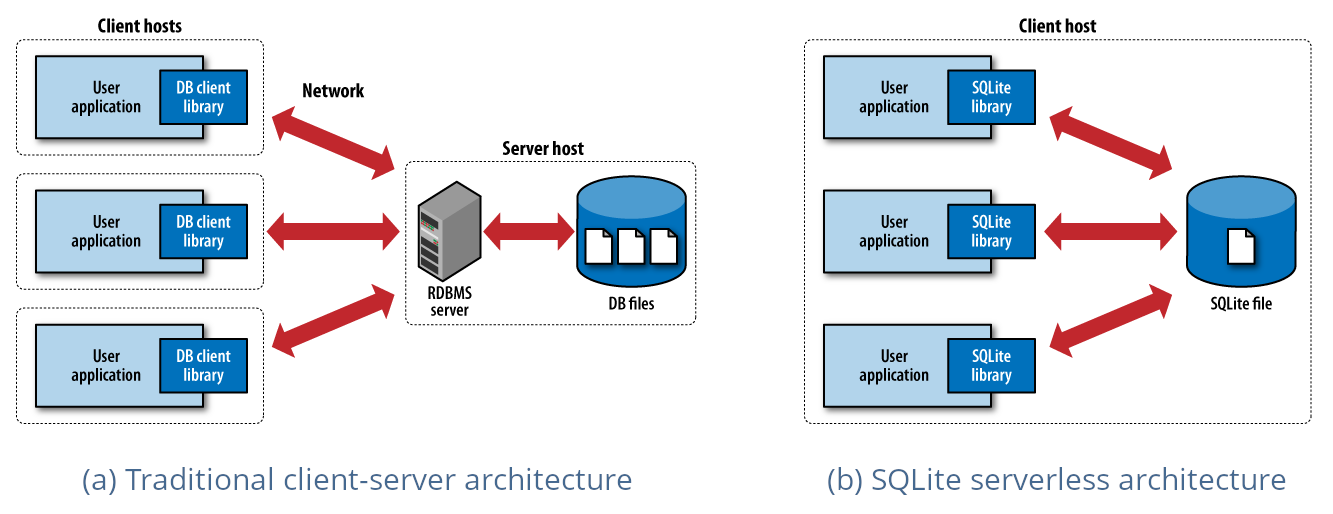
Unlike traditional client-server database management systems (DBMS) such as PostgreSQL or MySQL, SQLite is serverless. It does not run as a background service daemon or require network socket communication. Instead, the entire database engine is compiled directly into the application process as an embedded library, storing all tables, indexes, triggers, and schemas inside a single cross-platform file on disk.
Key Characteristics:
- Serverless & Embedded: Operates inside the application process; no server daemon, configuration, or IP ports required.
- Single-File Storage: The complete database (schema, tables, indexes, and data) resides in one disk file.
- Zero Configuration: No setup, installation, or administration needed before or after deployment.
- Cross-Platform Compatibility: The SQLite file format is platform-independent; a database created on a 64-bit Linux server can be read directly by a 32-bit iOS device or Windows PC.
- ACID Compliant: Guarantees full Atomic, Consistent, Isolated, and Durable transactions even in the event of application crashes or power failures.
2. Similar Technologies & Embedded Alternatives
While SQLite is the de facto standard for embedded transactional workloads, several other embedded database engines serve complementary or specialized use cases:
1. DuckDB
- Focus: Embedded Analytical / OLAP processing.
- Comparison: Often described as "the SQLite for analytics." While SQLite is optimized for transactional workloads (OLTP) using row-oriented storage, DuckDB utilizes columnar storage and vectorized execution, making it exceptionally fast for analytical queries, aggregations, and data science workloads over Parquet or CSV files.
2. RocksDB & LevelDB
- Focus: Embedded Key-Value Stores (NoSQL).
- Comparison: Developed by Google (LevelDB) and Meta (RocksDB), these are Log-Structured Merge-tree (LSM-tree) embedded storage engines. They do not support SQL schemas or query parsers out of the box, but excel at extremely high-throughput write workloads and fast key-value lookups.
3. Berkeley DB (BDB)
- Focus: Legacy Embedded Key-Value / Transactional Engine.
- Comparison: One of the earliest embedded database engines. It provides transactional key-value storage but lacks native SQL language support.
4. Realm (MongoDB Realm)
- Focus: Mobile Object Database.
- Comparison: Designed specifically for mobile platforms (iOS/Android), Realm stores native objects directly instead of relational tables, offering real-time cloud sync capability.
3. Advantages of SQLite Over Other Databases
Why choose SQLite over traditional client-server databases like PostgreSQL or MySQL?
1. Zero Administration & Maintenance
There are no database administrators required, no service daemons to monitor, no user account permissions to manage, and no network firewall ports to open. Deployment is as simple as launching your application binary.
2. Ultra-Fast Local Read/Write Speeds
Because SQLite operates within the same memory space as your application and reads directly from local storage without inter-process communication (IPC) or network latency, simple read and write queries are often significantly faster than client-server engines.
3. High Portability & Easy Backups
Backing up or transferring an entire database requires nothing more than copying a single .sqlite or .db file. This simplicity makes SQLite ideal for desktop applications, mobile apps, edge devices, application file formats, and local data caches.
4. Minimal Resource Footprint
The compiled SQLite library is under 1 MB in size and consumes minimal RAM, making it perfect for resource-constrained embedded systems and IoT microcontrollers.
5. Rich Feature Set & Standard SQL Support
SQLite supports a wide subset of ANSI-SQL, including JOINs, CTEs (Common Table Expressions), Window Functions, JSON operations, foreign key constraints, and triggers.
4. C Language Implementation Tutorial
Because SQLite is natively written in C, using its C API (sqlite3.h) is straightforward, lightweight, and fast. Below is a complete C tutorial demonstrating how to open a database, create a table, insert records securely using prepared statements, and query data using a callback function.
Prerequisites
- GCC or Clang Compiler
- SQLite3 Development Libraries:
- Ubuntu/Debian:
sudo apt-get install libsqlite3-dev - macOS: Pre-installed or via Homebrew (
brew install sqlite3) - Windows: Precompiled DLLs available from sqlite.org
- Ubuntu/Debian:
C Source Code (main.c)
#include <stdio.h>
#include <stdlib.h>
#include <sqlite3.h>

// Callback function to process query result rows from SELECT statements
static int select_callback(void *data, int argc, char **argv, char **azColName) {
    int i;
    printf("%s: ", (const char*)data);
    for (i = 0; i < argc; i++) {
        printf("%s = %s | ", azColName[i], argv[i] ? argv[i] : "NULL");
    }
    printf("
");
    return 0;
}

int main(void) {
    sqlite3 *db;
    char *err_msg = 0;
    int rc;

    // 1. Open or create an SQLite database file
    rc = sqlite3_open("app_data.db", &db);
    if (rc != SQLITE_OK) {
        fprintf(stderr, "Cannot open database: %s
", sqlite3_errmsg(db));
        sqlite3_close(db);
        return EXIT_FAILURE;
    }
    printf("Successfully connected to database 'app_data.db'
");

    // 2. Create a Table
    const char *sql_create_table =
        "CREATE TABLE IF NOT EXISTS users ("
        "id INTEGER PRIMARY KEY AUTOINCREMENT, "
        "name TEXT NOT NULL, "
        "email TEXT UNIQUE NOT NULL, "
        "created_at DATETIME DEFAULT CURRENT_TIMESTAMP);";

    rc = sqlite3_exec(db, sql_create_table, 0, 0, &err_msg);
    if (rc != SQLITE_OK) {
        fprintf(stderr, "SQL error (Create Table): %s
", err_msg);
        sqlite3_free(err_msg);
        sqlite3_close(db);
        return EXIT_FAILURE;
    }
    printf("Table 'users' verified/created successfully.
");

    // 3. Insert Data using Prepared Statements (Prevents SQL Injection)
    const char *sql_insert = "INSERT OR IGNORE INTO users (name, email) VALUES (?, ?);";
    sqlite3_stmt *stmt;

    rc = sqlite3_prepare_v2(db, sql_insert, -1, &stmt, 0);
    if (rc == SQLITE_OK) {
        // Bind First Record
        sqlite3_bind_text(stmt, 1, "Alice Smith", -1, SQLITE_STATIC);
        sqlite3_bind_text(stmt, 2, "alice@example.com", -1, SQLITE_STATIC);

        if (sqlite3_step(stmt) == SQLITE_DONE) {
            printf("Inserted user: Alice Smith
");
        }
        sqlite3_reset(stmt); // Reset statement for reuse

        // Bind Second Record
        sqlite3_bind_text(stmt, 1, "Bob Jones", -1, SQLITE_STATIC);
        sqlite3_bind_text(stmt, 2, "bob@example.com", -1, SQLITE_STATIC);

        if (sqlite3_step(stmt) == SQLITE_DONE) {
            printf("Inserted user: Bob Jones
");
        }
    } else {
        fprintf(stderr, "Failed to prepare insert statement: %s
", sqlite3_errmsg(db));
    }
    sqlite3_finalize(stmt); // Free statement resources

    // 4. Query Data using sqlite3_exec with Callback
    const char *sql_select = "SELECT id, name, email, created_at FROM users;";
    const char *callback_label = "User Record";

    printf("
--- Querying Users Table ---
");
    rc = sqlite3_exec(db, sql_select, select_callback, (void*)callback_label, &err_msg);
    if (rc != SQLITE_OK) {
        fprintf(stderr, "SQL error (Select): %s
", err_msg);
        sqlite3_free(err_msg);
    }

    // 5. Close Database Connection
    sqlite3_close(db);
    printf("
Database connection closed successfully.
");

    return EXIT_SUCCESS;
}
Compiling and Running
# Compile C source code with GCC linking libsqlite3 (-lsqlite3)
gcc main.c -o sqlite_demo -lsqlite3

# Execute the binary program
./sqlite_demo
5. Inspecting SQLite Files Online with Mitos.dev
When building C applications, mobile apps, or web services, inspecting .db or .sqlite files can be challenging without dedicated desktop software installed.
With the mitos.dev SQLite Browser, you can open, parse, and browse your SQLite database files directly in your web browser with zero setup!
Key Features of mitos.dev SQLite Browser:
- 100% Client-Side & Secure: Your database files are parsed locally using WebAssembly (Wasm) and are never uploaded to any remote server.
- Interactive Schema & Table Viewer: View tables, column types, primary keys, and indexes in a clean, tabular interface.
- Custom SQL Execution: Run custom
SELECTqueries, filter records, and inspect execution results instantly. - Zero Installation: Works in any modern web browser on desktop, tablet, or mobile devices.
Try the online tool today at https://mitos.dev/tools/sql-lite-browser!
6. Feature Comparison Matrix
| Feature | SQLite | DuckDB | PostgreSQL | RocksDB |
|---|---|---|---|---|
| Architecture | Embedded (Serverless) | Embedded (Serverless) | Client-Server | Embedded (Serverless) |
| Primary Workload | OLTP (Transactional) | OLAP (Analytical) | Enterprise / OLTP | Key-Value Store |
| Storage Engine | B-Tree | Columnar | B-Tree / Heap | LSM-Tree |
| SQL Syntax Support | Full standard SQL | Full analytical SQL | Advanced Enterprise SQL | None (Key-Value) |
| Setup Complexity | Zero Configuration | Zero Configuration | Server Installation | Library Integration |
Conclusion
SQLite remains a cornerstone of modern software development. Its zero-configuration model, single-file architecture, ACID compliance, and blazingly fast local execution make it the premier choice for embedded systems, mobile applications, and local software data stores.
Combined with C native integration and browser-based inspection tools like mitos.dev SQLite Browser, managing SQLite databases is simpler and more accessible than ever!